
Controls: agreed drive names and stop procedure. Launcher: mounting space, weight location and cable clearance.
BUILD → CODE → TEST → HAND OFF
Three crews. One robot. Every step explained.
PATHFINDER / 2026–27 BUILD HQ
Three crews.
One working robot.
Choose your crew. Follow its exact build pages, learn why the mechanism works, run its Java test, and share a proven handoff.
Concept art · follow REV diagrams for real assemblyAFTER THE MATCH / SAME SKILLS, BIGGER MACHINES
Drivetrain → Autonomous rover
ON OUR ROBOT
Our base must roll straight, turn on command, and stop.
ON A LARGER PROJECT
A planetary rover adds terrain sensing and route planning so it can choose a safe path around hazards.
Who it helps: Robots can explore places people cannot safely or easily drive through.
What carries forward
- Gear ratio + traction become terrain mobility.
- Five-run drift data becomes a reason to add position sensing.
- A safe stop becomes obstacle detection and route replanning.
Try next: Plan a route, add one obstacle, then check whether the rover stops before it.
Concept art of our robot on a planned route. The glowing path is a visualization—not a sensor included in the starter kit.
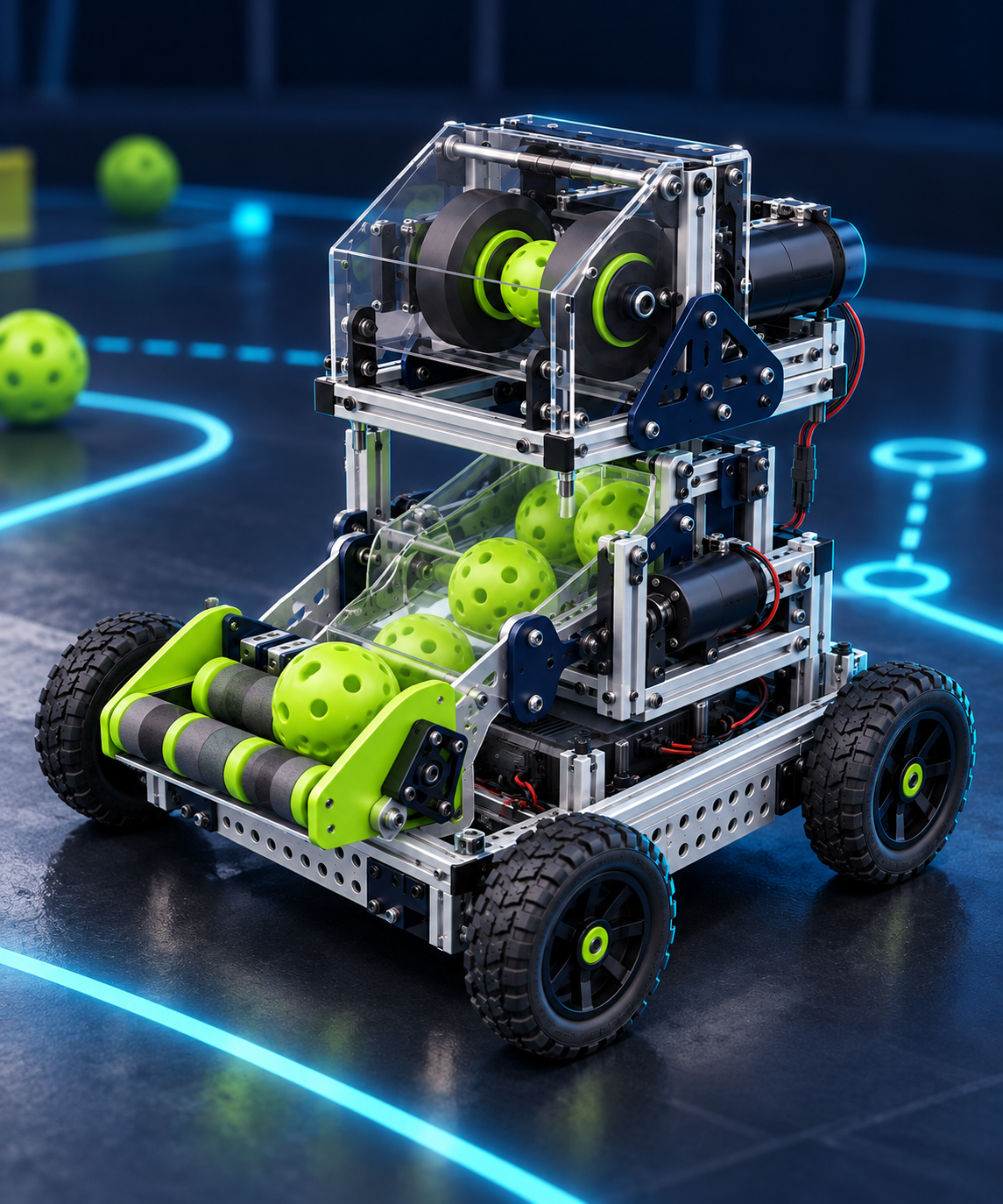
Build the real robot first.
Our reference: FTC Competition Set V3.1 (Build, Driver and Electronics portions) with REV’s 2026–27 BIOBUZZ Starter Bot plan. Check the separate 2 mm polycarbonate sheet against your inventory. Other schools can adapt the guide to their actual hardware with a mentor.
Future Lab is a simulation. Its code and settings do not run our robot or certify a larger machine. The crew Java files below are teaching tests; verify wiring and safety before PLAY.
MOVE / YOUR BUILD + CODE PLAN
Drivetrain crew
Build a stable base that goes where the driver expects—and stops.
Start with the REV build pages, explain the mechanics, read and download your Java test, then prove a safe handoff.
A square rolling base, labeled drive devices, measured test results and mounting notes.
YOUR FIRST MOVE
Set front/left/right labels; prepare two 20:1 drive motor groups and four 56-link drive chains.
Go in order. A REV PDF page is the exact diagram; Pathfinder adds the student-friendly action and pause check. Page numbers below are PDF pages, not game-rule pages.
01 / BUILD
Put the real pieces together
10 mapped build stages. Follow the REV diagrams and pause whenever a shared assembly must be handed to another crew.
01REV PDF p. 10Build the motor and gearbox groups
Gather: HD Hex motors, UltraPlanetary cartridges, motor plates, outputs, and mounting brackets
- Follow pages 10–17 for the two 20:1 drive motor/gearbox groups and the 1:1 launcher group. Keep the groups labeled.
- Check the cartridge order, output orientation, mounting bracket, and fastener lengths against each diagram. A mentor reviews any threadlocker use and tightening.
Pause & explain: Are both drive outputs assembled alike, with the launcher motor clearly separate?
See exact REV diagram · PDF p. 10 ↗02REV PDF p. 18Stack the drive shafts
Gather: 90 mm 5 mm hex shafts, omni wheels, bearings, spacers, shaft collars, 10-tooth sprockets
- Use pages 18–34 to make two drive shafts, two single-sprocket shafts, and two double-sprocket shafts. Keep the bearing, spacer, and sprocket order shown for each type.
- Some drive-shaft parts are used temporarily to establish spacing and reinstalled later. Keep them with the same shaft in a labeled tray.
Pause & explain: Do both left and right sets spin freely and retain the intended spacing?
See exact REV diagram · PDF p. 18 ↗03REV PDF p. 35Make the chain loops
Gather: #25 chain and the kit chain tool
- Read the chain-tool sequence on pages 35–39 with a mentor. The guide calls for one 54-link intake loop and four 56-link drive loops on page 40.
- Count the links before closing each loop. Avoid pushing a pin all the way out unless you have the correct master-link plan.
Pause & explain: Are the one short loop and four drive loops separately labeled and free of twisted links?
See exact REV diagram · PDF p. 35 ↗04REV PDF p. 52Build the first motor rail
Gather: 20:1 drive motor group, 408 mm C channel, endcap, 120 mm extrusion, lap brackets, four 40 mm standoffs
- Fasten the gearbox output at the fourth hole from the end of the C channel, using the diagram on page 52 for orientation. Add the endcap and the small upright extrusion.
- Place the lap brackets and four standoffs as shown through page 58. Leave the brackets that must accept later cross pieces adjustable.
Pause & explain: Does the motor output line up with the future drive shaft, without binding?
See exact REV diagram · PDF p. 52 ↗05REV PDF p. 59Install the first chain drive
Gather: Drive shaft, single and double sprocket shafts, two 56-link chains, collars, tensioning bushings
- Loop the two chains around the three matching sprockets and place the drive shaft into the motor output. Route each loop around its standoffs as shown.
- Retain the other shafts with collars, add the tensioning bushings, and close the rail with the second 408 mm C channel. Turn the system by hand with power disconnected.
Pause & explain: Do both chains stay on their sprockets without rubbing the channel?
See exact REV diagram · PDF p. 59 ↗06REV PDF p. 64Mirror the second rail
Gather: Second 20:1 drive motor, C channels, remaining drive shafts, two 56-link chains, standoffs, collars
- Build the opposite rail from pages 64–73. Mirror its orientation; do not assume that the motor and bracket directions are identical to the first rail.
- Check the chain path and hand rotation before tightening the adjustable brackets.
Pause & explain: Do the two rails form a left/right pair with the same free motion?
See exact REV diagram · PDF p. 64 ↗07REV PDF p. 74Install the prepared flower pusher
Gather: Completed pusher from assembly 02 and its servo bracket
- Slide the servo bracket onto the indicated second drive rail before closing the full base. The guide places its arm next to the endcap.
- With power isolated, move the arm through its intended path and adjust the bracket if the arm catches on the extrusion.
Pause & explain: Can the arm travel without striking the rail, wheel, or a cable?
See exact REV diagram · PDF p. 74 ↗08REV PDF p. 76Join and square the chassis
Gather: 248 mm C channels and extrusion crossmembers, corner brackets, both completed rails
- Add the 248 mm cross pieces as shown on pages 76–82. Bring the rails together and align the brackets before final tightening.
- Stand the open rail ends on a flat surface or check with a square. Fix any twist now; a skewed base will affect wheel contact and straight-line driving.
Pause & explain: Are both rails parallel and the frame square?
See exact REV diagram · PDF p. 76 ↗09REV PDF p. 77Mount power and controls
Gather: Battery holder, hook-and-loop restraint, Control Hub, 16 mm mounting screws, switch bracket
- Mount the battery holder between the rails, make a secure removable battery restraint, then take the battery back out during the rest of assembly.
- Attach the Control Hub and the two 420 mm cross extrusions as shown on pages 78–83. Put the switch where a driver or mentor can reach it quickly.
Pause & explain: Can the battery be removed, wires be routed safely, and the main switch still be reached?
See exact REV diagram · PDF p. 77 ↗10REV PDF p. 83Fit wheels and future mounts
Gather: Omni, grip, and traction wheels, through-bore bearings, collars, four 70 mm mounting extrusions
- Fit the omni wheel on each drive shaft and the grip and traction wheels on the remaining shafts using the bearing and collar order on pages 83–84.
- Add the four upright mounting pieces from pages 84–86. These will support later assemblies, so compare their orientation to REV’s pictures.
Pause & explain: Do all wheels turn freely, and are the upright mounts positioned as matched pairs?
See exact REV diagram · PDF p. 83 ↗02 / UNDERSTAND
Know why it works
Each builder should be able to show—not just recite—these ideas on the unpowered robot.
Torque versus speed
The two 20:1 gearboxes trade speed for turning force. Do not swap in the 1:1 flywheel motor.
SHOW ITTurn each unpowered shaft; compare resistance and identify the gearbox labels.
Chain alignment and tension
A crooked sprocket or tight chain steals power and can derail the drive.
SHOW ITRotate each rail by hand through a full loop. Check for rub, slack and uneven tight spots.
Square frame and traction
Skewed rails and mismatched wheel contact make a robot drift even when both motors receive the same command.
SHOW ITMeasure diagonals, roll straight by hand, then record five low-speed floor runs.
03 / CODE
Read it. Put it on the controller. Test it.
One standalone, commented OnBot Java OpMode for this crew. It uses REV’s reference hardware names; verify every name, port, type and direction on your robot first.
hardwareMap
Finds a configured motor by its exact name; leftDrive and rightDrive must match the actual Control Hub setup.
Direction
Reverses one side in software when the real wheel orientation requires it. Verify with wheels raised before a floor run.
Arcade mix
left = forward + turn; right = forward − turn. Clipping keeps both commands inside the legal motor-power range.
Deadman + STOP
The test only moves while left bumper is held. Releasing it commands zero; Driver Station STOP ends the OpMode.
PathfinderDriveTest.java↓ Download .java
Loading Java…From this page to your Control Hub
- Download PathfinderDriveTest.java while connected to the internet. Keep this guide open or save it for offline use.
- With your mentor, verify the robot hardware map and physical safety first. These test files use REV’s names; the actual configuration must match exactly.
- Join the Control Hub programming network. Open the Robot Controller Console address shown on your Driver Station/Hub, then choose OnBot Java.
- Create or upload a file named PathfinderDriveTest.java; keep the class name the same. Build it and resolve every compile/configuration error before continuing.
- Select Pathfinder Drive Test in Driver Station. INIT, read telemetry, then PLAY only in a mentor-approved test area.
- Use the controls below, prove release and STOP, and report the actual behavior. These three files are separate tests, not three programs to run simultaneously.
Android Studio teams can place the same file in TeamCode under org.firstinspires.ftc.teamcode. Do not paste it into a different class without adjusting the package and filename.
What this test actually does
- Hold LEFT BUMPER to enable the low-power test.
- LEFT STICK forward/back = forward/reverse. LEFT STICK sideways = turn.
- Release LEFT BUMPER, then press Driver Station STOP to prove both stop paths.
A successful code build does not prove physical wiring or safe travel. Observe the real robot.
After all three crews pass: combine the robot
Download the separate PathfinderRobotTeleOp.java integration lesson. It drives, intakes, spins the flywheel on Y, and uses a short feeder pulse only after Y has been held for 1.5 seconds and LEFT BUMPER is newly pressed. Release and press LEFT BUMPER again to request another pulse. The time gate is not a wheel-speed sensor and a pulse does not guarantee one ball. The pusher stays disabled until a mentor measures safe endpoints.
Begin with no ball and a supported robot; move to a clear, guarded lane only after release and Driver Station STOP work for every output. This is an educational starting point, not competition-ready code.
04 / PROVE + HAND OFF
Show the other crews what is real
Safe test ladder
- Battery isolated: spin wheels and chains by hand; fix rubbing.
- Robot supported: confirm left/right motor mapping, direction, enable/release, then STOP at low power.
- Clear floor: mark start/end; drive five short runs and measure drift.
- Hand Controls the real port/name/direction map and Launcher the clear mounting footprint.
Definition of done
- Both 20:1 drive motors and four drive chains accounted for.
- Base square, wheel/chain travel free, switch accessible.
- Exact leftDrive/rightDrive ports and direction verified on the robot.
- Five route results and remaining drift question shared.
Never treat the PDF or Java as approval to run a mechanism. A mentor checks the actual robot, current FIRST rules, guarding, battery, cable paths and clear area before powered tests. Isolate power before fixing a jam.
Want a guided group activity? Open the five crew sessions
Use these shorter workshops after reading your build, code and test plan above.
ACTIVITY 1 / 5 · ABOUT 20 MINUTES
Make the base plan
Agree where the drive, controller and launcher will fit.
Bring: Kit guide, unpowered parts, ruler, paper and the other two crews.
Planning activity: work from unpowered parts, pictures or code. No powered motion is needed. Explore freely, but review earlier dependencies before a physical test.
- 1
Identify your exact kit and the drivetrain in its official guide. For the FIRST V3.1 bundle, start with the REV reference—not a mecanum assumption.
- 2
Sketch the footprint. Mark front, drive wheels, switch access and a proposed launcher mounting area.
- 3
Meet the other crews. Agree what must stay clear for cables, guards and ball movement.
Pause. Check. Explain.
Talk through these together. Use paper or your own notebook for measurements—nothing to submit here.
- We marked front and the proposed mounting area.
- We identified the correct kit guide.
- The other crews heard our space and access plan.
Try explaining: Record the mounting area or a dimension, plus one agreement with another crew.
Stuck? Try one useful check.
Wheels rubbing or driving the wrong way? Stop first. With power isolated, check clearance and labels. Ask Controls to compare the wiring with the actual configuration before the mentor approves another direction test.
SHOW & TELL / NOT PAPERWORK
Show what works. Explain what is next.
Gather around the unpowered robot. Each crew can finish these sentences:
Say what has not been tested yet, too. A mentor reviews mounting, ports, guards and stop behavior before staged powered integration. Keep untested mechanisms disabled.
Check current FIRST rules and updates ↗